

Table of Contents
ToggleXero vs QuickBooks UAE: Which Accounting Software Is Best for Your Business?
Choosing between Xero vs QuickBooks UAE is one of the first practical decisions many business owners face once they move beyond spreadsheets. The right platform affects how accurately you track VAT records, how ready your books are for Corporate Tax reporting, how easily your accountant can collaborate with you, and how well your finances scale as the business grows.
Both Xero and QuickBooks Online are established cloud accounting platforms used by businesses across Dubai, Abu Dhabi, and the wider UAE. Neither is universally “better” — the right choice depends on your business size, industry, reporting needs, and how you plan to work with your accounting team. This guide breaks down both platforms specifically through a UAE lens, so you can make an informed decision rather than a guess.
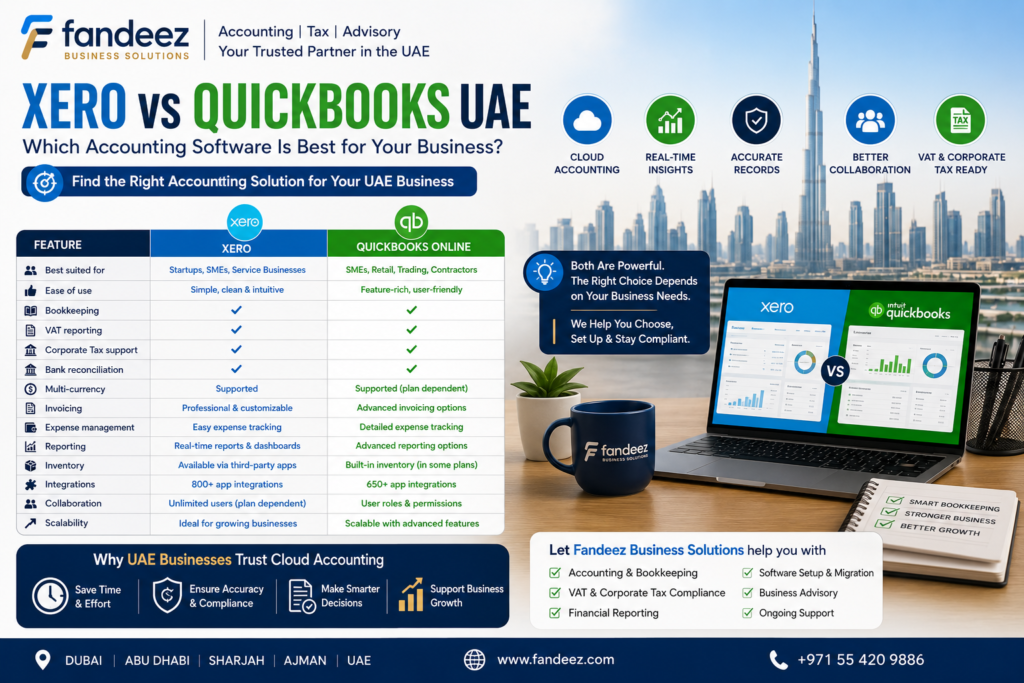
Xero vs QuickBooks UAE: Quick Comparison
Direct answer: Both Xero and QuickBooks Online offer cloud-based bookkeeping, invoicing, bank reconciliation, and reporting suited to UAE businesses — the practical differences tend to show up in interface style, plan structure, and the specific integrations each business needs.
| Feature | Xero | QuickBooks Online |
|---|---|---|
| Best suited for | Startups and SMEs wanting a clean, simple workflow | Businesses wanting broader reporting and add-on functionality |
| Ease of use | Generally considered intuitive for non-accountants | Familiar layout, widely used by accountants globally |
| Bookkeeping | Core double-entry bookkeeping included | Core double-entry bookkeeping included |
| VAT reporting | Supports VAT-related transaction tracking and reports | Supports VAT-related transaction tracking and reports |
| Corporate Tax record support | Helps organize records for tax computation, not automatic filing | Helps organize records for tax computation, not automatic filing |
| Bank reconciliation | Available, with bank feed connections | Available, with bank feed connections |
| Multi-currency | Available on applicable plans | Available on applicable plans |
| Invoicing | Customizable invoicing included | Customizable invoicing included |
| Expense management | Built-in, with receipt capture options | Built-in, with receipt capture options |
| Reporting | Strong standard reporting suite | Strong standard reporting suite, often seen as more granular |
| Inventory | Basic inventory features, plan-dependent | More developed inventory tracking on applicable plans |
| Integrations | Large third-party app marketplace | Large third-party app marketplace |
| Collaboration | Unlimited users on most plans historically favored by advisors | User access typically tied to subscription tier |
| Scalability | Scales well for SMEs and multi-entity setups with the right plan | Scales well, with tiers built for growing reporting needs |
Availability of specific features, user limits, and pricing tiers can change and often depends on the exact plan selected, so it’s worth checking each provider’s current offering directly, or having your accountant confirm what fits your business before you commit.
What Is Xero?
Xero is a cloud-based accounting platform built around a single, shared set of books that business owners, bookkeepers, and accountants can all access in real time. It’s designed to keep core bookkeeping tasks — invoicing, expense tracking, bank reconciliation, and reporting — in one straightforward interface.
Commonly used Xero features include:
- Online bookkeeping with a live, shared ledger
- Customizable invoicing and automated payment reminders
- Bank reconciliation through connected bank feeds
- Expense management, including receipt capture
- Financial reporting, including standard reports like Profit & Loss and Balance Sheet
- Multi-currency functionality on applicable plans
- Unlimited user collaboration on many plans, useful for accountant access
- A wide marketplace of third-party integrations
Xero tends to appeal to startups and SMEs that want a clean, uncluttered accounting workflow without a steep learning curve — particularly businesses that plan to lean on an external accountant or bookkeeper for day-to-day support.
What Is QuickBooks Online?
QuickBooks Online is another widely used cloud accounting platform, known for its long-standing presence in the small business and accounting community globally. It covers the same core bookkeeping ground as Xero, with some businesses finding its reporting and add-on ecosystem particularly useful as they scale.
Commonly used QuickBooks Online features include:
- Bookkeeping and double-entry accounting
- Invoicing and recurring billing
- Expense tracking, including receipt and mileage capture
- Bank reconciliation via bank feed connections
- Financial reporting, with a range of report customization options
- Inventory-related functionality, available on certain plans
- Project or job tracking features, available on certain plans
- Multi-currency functionality, available on certain plans
- Integrations with a broad range of third-party business applications
QuickBooks may suit businesses looking for more granular reporting options or specific functionality like inventory or project tracking, particularly as operations become more complex.
Xero vs QuickBooks for UAE VAT
Direct answer: Neither Xero nor QuickBooks automatically makes a UAE business VAT compliant. Both can help organize sales and purchase transactions, track input and output VAT, and generate reports that support VAT filing — but compliance itself depends on how the software is configured and how the business applies UAE VAT rules.
Where accounting software genuinely helps with VAT is in:
- Recording sales invoices and purchase invoices with the correct tax treatment applied
- Tracking input VAT (VAT paid on purchases) and output VAT (VAT charged on sales)
- Generating VAT reports that summarize a tax period’s transactions
- Categorizing transactions consistently, which supports accurate reporting
- Supporting documentation storage, such as attaching invoices to transactions
- Reconciling VAT figures against bank and sales records before filing
What software does not do on its own is confirm that your VAT registration is correct, that transactions are categorized under the right VAT treatment, or that your return is ready for submission to the Federal Tax Authority (FTA). That step still requires a knowledgeable review — either from an in-house finance team or a VAT specialist — to make sure the numbers the software produces are actually accurate and filing-ready.
Xero vs QuickBooks for UAE Corporate Tax
Direct answer: Accounting software can support Corporate Tax compliance by maintaining accurate financial records, but accounting profit shown in Xero or QuickBooks is not automatically the same as taxable income under UAE Corporate Tax rules.
Here’s the relationship worth understanding:
Accounting Profit ≠ Automatically Taxable Income
Both platforms can help with the record-keeping side of Corporate Tax compliance by supporting:
- Revenue and expense tracking throughout the year
- Financial statement generation (Profit & Loss, Balance Sheet)
- Consistent categorization of business expenses
- Supporting documentation for transactions
- Management reporting that gives visibility into financial performance
However, arriving at taxable income generally requires applying specific tax adjustments to accounting profit — such as non-deductible expenses, exempt income, and reliefs available under UAE Corporate Tax legislation. Neither Xero nor QuickBooks performs this UAE-specific tax computation automatically. This is where good bookkeeping in either platform becomes the foundation for an accurate Corporate Tax filing, rather than a substitute for it.
Xero vs QuickBooks: Ease of Use
For business owners without an accounting background, Xero is often described as approachable, with a relatively simple dashboard and workflow. QuickBooks Online is also designed to be user-friendly, though some new users find its reporting menus and settings slightly more detailed to navigate at first.
For bookkeepers and finance teams, both platforms are widely taught and supported, so familiarity often comes down to prior experience rather than one platform being objectively easier.
For accountants, both Xero and QuickBooks have large practitioner communities in the UAE, and most accounting firms — including firms offering Accounting Services — are comfortable working across either platform. The more relevant question is usually which platform your accountant already uses efficiently for businesses like yours.
Xero vs QuickBooks: Reporting and Financial Management
Reliable reporting is one of the biggest practical benefits of moving to cloud accounting software, regardless of which platform you choose. Both Xero and QuickBooks support the reports UAE businesses rely on most:
- Profit & Loss — shows revenue, expenses, and net profit over a period
- Balance Sheet — shows assets, liabilities, and equity at a point in time
- Cash Flow — tracks cash movement in and out of the business
- Accounts Receivable — tracks what customers owe you
- Accounts Payable — tracks what you owe suppliers
- Expense reports — break down spending by category or project
- Management reports — customizable views for internal decision-making
Accurate, up-to-date reports give business owners a clearer picture for decisions like pricing, hiring, or managing cash flow — but the value of any report depends entirely on how consistently and correctly the underlying transactions were recorded.
Xero vs QuickBooks: Integrations and Automation
Both platforms connect with a wide range of third-party tools, though the specific list of available integrations varies by provider, region, and subscription tier. Commonly connected categories include:
- Banks — for automated bank feed connections
- Payment platforms — for online invoice payments
- E-commerce platforms — for syncing sales transactions
- Payroll systems — for wage and WPS-related processing
- CRM systems — for linking sales and customer data
- Inventory applications — for stock tracking, particularly for retail businesses
- Expense management tools — for receipt capture and approval workflows
Because integration availability changes over time and depends on the specific third-party provider, it’s worth confirming compatibility with your actual tools — POS systems, e-commerce platforms, or payroll providers — before finalizing your choice, rather than assuming every integration you need is automatically supported.
Which Is Better for UAE Startups?
Direct answer: For most UAE startups, the better choice tends to be whichever platform is simpler for the founder to use day-to-day and easiest for their accountant or bookkeeper to support — many startups find Xero’s straightforward interface a comfortable starting point, though QuickBooks works equally well for founders already familiar with it.
Factors worth weighing as a startup:
- Budget — compare current plan pricing directly with each provider, since pricing structures change
- Simplicity — how much time can you realistically spend on bookkeeping tasks yourself
- Number of users — whether you need multiple team members or an external accountant to have access
- Business model — service-based startups often need less complexity than product-based ones
- Reporting needs — investors or stakeholders may expect certain standard reports
- Expected growth — whether you’re likely to need inventory, multi-currency, or project tracking soon
- Accountant access — check which platform your bookkeeper or accounting partner works with most efficiently
Which Is Better for UAE SMEs?
Direct answer: As a UAE SME grows, the better platform is generally the one that scales with the business’s increasing reporting, inventory, multi-currency, or integration needs — this can be either Xero or QuickBooks depending on the specific plan and add-ons available at the time.
Growing businesses often start to need:
- More advanced or customizable reporting
- Better inventory tracking across multiple locations or channels
- Project or job costing functionality
- Deeper integrations with e-commerce, CRM, or payroll systems
- Multi-currency support for regional or international transactions
- Multiple user roles with different permission levels
Neither platform is universally superior for every growing SME — the right fit depends on which specific features matter most to your operations at your current stage, and how those needs are likely to evolve.
Xero vs QuickBooks for Different UAE Businesses
| Business Type | Potentially Suitable Option | Why |
|---|---|---|
| Freelancer/Consultant | Either platform’s entry-level plan | Simple invoicing and expense tracking are usually sufficient |
| Startup | Depends on founder preference and accountant support | Ease of use and accountant collaboration matter most early on |
| Service Business | Either platform, depending on reporting needs | Core bookkeeping and invoicing needs are similar across platforms |
| Retail Business | Platform with stronger inventory functionality on the relevant plan | Stock tracking and point-of-sale integration become important |
| E-commerce Business | Platform with strong integration support for your sales channels | Multiple sales channels need reliable syncing and reconciliation |
| Growing SME | Platform offering the reporting depth and user tiers needed | Reporting complexity and team access needs increase with growth |
| Multi-currency Business | Either platform’s multi-currency-enabled plan | Both support multi-currency on applicable subscription tiers |
This table is a starting point, not a rule — the right option always depends on your business’s actual requirements and the specific plan you select.
Hypothetical UAE Business Examples
The following examples are hypothetical and are used purely to illustrate how different UAE businesses might approach this decision. They do not represent real Fandeez clients.
Example 1: Dubai Startup
A hypothetical small Dubai consulting startup, “Nova Consulting,” needs simple invoicing, basic expense tracking, straightforward bank reconciliation, and the ability for its external accountant to log in and review the books each month. For a business like this, either Xero or QuickBooks’ entry-level plan is likely to cover the core requirements — the deciding factor is often which platform the founder finds easiest to use and which their accountant is set up to support efficiently.
Example 2: UAE Retail Business
A hypothetical growing retail company, “Marina Home Goods,” operates from a physical store and is expanding to a second location. Its priorities shift toward stronger inventory tracking, multi-location reporting, and integration with its point-of-sale system. For a business at this stage, the deciding factor becomes which platform’s inventory and reporting functionality, on the relevant plan, actually matches its operational complexity — not simply which platform is more popular.
Example 3: UAE E-commerce Business
A hypothetical online business, “Desert Bloom Online,” sells through its own website and two third-party marketplaces. It processes a high volume of transactions across multiple payment gateways. For this business, integrations, transaction reconciliation, and automation matter more than almost any other factor — the software needs to reliably sync sales data and keep VAT-related records accurate across every channel without manual re-entry.
How to Choose the Best Accounting Software in the UAE
Use this checklist to guide your decision:
- Business size and complexity
- Industry-specific needs (retail, services, e-commerce, etc.)
- Number of users who need access
- VAT record-keeping and reporting requirements
- Corporate Tax record requirements
- Whether inventory tracking is needed
- Whether multi-currency transactions are common
- Reporting depth required for decision-making
- Integrations needed with your existing tools
- Whether your accountant needs direct access
- Scalability as the business grows
- Budget, based on current provider pricing
- Data security and access controls
- Quality and availability of customer support
Common Mistakes When Choosing Accounting Software
Even well-run businesses fall into a few avoidable traps:
- Choosing based on price alone, without checking whether core features fit the business
- Ignoring future growth and outgrowing the platform within a year
- Not checking whether key integrations (POS, payroll, e-commerce) are actually supported
- Setting up a poor or generic chart of accounts that doesn’t reflect the business
- Not configuring VAT settings correctly from the start
- Failing to reconcile bank accounts regularly
- Assuming the software automatically ensures UAE tax compliance
- Not maintaining supporting documents alongside transactions
- Giving incorrect or overly broad user permissions
- Rarely reviewing the reports the software generates
Do You Still Need an Accountant?
Direct answer: Yes. Accounting software can automate many day-to-day tasks, but professional accounting and tax support is still important for accurate bookkeeping, VAT compliance, Corporate Tax calculations, financial reporting, and broader business advisory.
An accountant typically adds value in areas software alone doesn’t cover, including:
- Correct initial software setup and chart of accounts design
- Ongoing bookkeeping accuracy and review
- Bank reconciliation oversight
- VAT reporting review before FTA filing
- Corporate Tax calculations, including the adjustments accounting profit doesn’t automatically capture
- Preparing and reviewing financial statements
- Periodic tax compliance reviews
- Management reporting that supports real business decisions
Software and professional support work best together — the software organizes your data, and an accountant makes sure that data translates into accurate, compliant outcomes.
How Fandeez Business Solutions Can Help
Choosing between Xero and QuickBooks is only the first step — getting the platform set up correctly and used consistently is what actually protects your business. Fandeez Business Solutions helps UAE businesses with:
- Xero setup, configuration, and ongoing accounting support
- QuickBooks setup, configuration, and ongoing accounting support
- Bookkeeping that keeps your chosen platform accurate and up to date
- VAT accounting and return preparation support
- Corporate Tax support, including Corporate Tax Registration and Corporate Tax Filing
- Financial reporting tailored to what your business actually needs to track
- Bank reconciliation and ongoing data accuracy checks
- Accounting system reviews for businesses unsure if their current setup is working
- Auditing support where required
- Business Advisory to help you plan around accurate financial data
Whether you’re choosing your first accounting platform or reviewing whether your current one still fits, the goal is the same: software that supports accurate records, and a team that makes sure those records hold up.
FAQs About Xero vs QuickBooks UAE
1. Is Xero or QuickBooks better for UAE businesses? Neither is universally better. Both offer solid cloud bookkeeping, invoicing, and reporting for UAE businesses — the right choice depends on your specific needs, your accountant’s familiarity with the platform, and the plan you select.
2. Is Xero suitable for small businesses in the UAE? Yes, Xero is commonly used by UAE startups and small businesses, particularly those that value a simple, easy-to-navigate interface and straightforward accountant collaboration.
3. Is QuickBooks suitable for UAE SMEs? Yes, QuickBooks Online is also widely used by UAE SMEs, especially businesses that want more granular reporting options or specific functionality like inventory or project tracking on applicable plans.
4. Which accounting software is better for UAE VAT? Both platforms can support VAT-related record-keeping, transaction categorization, and reporting. Neither guarantees VAT compliance on its own — accurate configuration and review remain essential regardless of which platform you use.
5. Does accounting software automatically ensure UAE tax compliance? No. Accounting software helps maintain records, calculate VAT-related figures, and generate reports, but businesses remain responsible for ensuring those records and filings meet applicable UAE VAT and Corporate Tax requirements.
6. Can Xero and QuickBooks handle multi-currency accounting? Both platforms offer multi-currency functionality, though availability typically depends on the specific subscription plan — it’s worth confirming current plan details before assuming multi-currency support is included.
7. Do I still need an accountant if I use Xero or QuickBooks? Yes. Software automates many tasks, but professional review remains important for accurate bookkeeping, VAT compliance, Corporate Tax calculations, and reliable financial reporting.
8. How can Fandeez help with Xero or QuickBooks accounting? Fandeez Business Solutions supports UAE businesses with software setup, bookkeeping, VAT accounting, Corporate Tax support, financial reporting, and ongoing advisory — helping you get real value from whichever platform you choose.
Conclusion
When it comes to Xero vs QuickBooks UAE, there’s no single right answer for every business — both platforms offer strong cloud accounting fundamentals, and the better fit depends on your business size, industry, reporting needs, and how you plan to work with your accounting team. What matters most isn’t the logo on your dashboard, but whether your books are accurate, your VAT records are properly maintained, and your financial data is ready to support Corporate Tax compliance when the time comes.
If you’d like help choosing, setting up, or getting more value from Xero or QuickBooks, Fandeez Business Solutions is here to help. Contact our team today for support with accounting software setup, bookkeeping, VAT, Corporate Tax, financial reporting, and business advisory built around how your UAE business actually operates.